
Background
I had been listening to the Darknet Diaries security podcast, specifically the Superbox / ep 172 episode.
The security resarcher, D3ada55, mentioned her dad had bought a whole load of cheap streaming devices from Walmart, and she discovered they were sending vast quantities of data to China (odd, since they were installed in North America!). Clearly something weird was going on. The rest of the episode was interesting and informative as usual.
During this, I had a thought: say I had a compromised device on my network. How would I know? Hmmmmm.
So I grabbed Claude Code and built a solution!
Basic Functionality
- Gather details of network connections to the internet.
- Store and digest them.
- Alert me if something looks bad ASAP.
- Daily updates of changes to nework access profile.
- Charts with some simple dimensonal breakdowns (gotta have charts).
- Keep current with theats over time.
Implementation
Gathering Network Data
Here is a quick diagram of my network infrastucture: 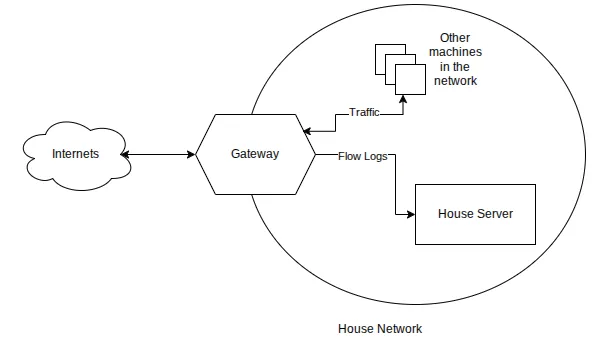 .
.
Like many networks, all traffic to the internet flows through a single gateway, making it an obvious data gathering point.
My gateway is manufactured by Mikrotik who have more professional features in their gear.
So, I enabled the IPFIX netflow data collection on the gateway. This means details of each traffic flow will be relayed to my house server. The volume is relatively low as it is just the flow metadata, and not the contents/details of every single packet.
Third Party Data
The system downloads the following data sources on a daily basis:
- Spamhaus drop list - IPs known to be used by professional spam or cyber crime operators maintained by Spamhaus.
- Firehol level1 - Bad IP list maintained by Firehol.
- Feodo Tracker - List of botnet command and control server IPs maintained by Feodo Tracker. Note, this list is currently empty due to successful takedowns of these botnets.
- ipsum l5 - aggregation of suspicious/malicious IP address lists maintained by Stamparm ipsum.
- Tor exit nodees - list of Tor exit nodes maintained by the Tor project itself. More details on including this shortly.
- Maxmind free geoip location data - this allows the system to resolve IPs to country and network.
Processes
On my house server, there are various processes running in a single Docker container:
- goflow2 - provided by the netsampler/goflow2 package - receives the data from the gateway and saves to disk in JSON format.
- flow-analyzer - digests the above received data every minute and checks for any obviously connections to threat systems.
- daily-summary - sends a daily email of changes in the network profile.
- web-server - A tiny web server allowing interactive exploration of the data.
- ti-updater - keeps the third party data sets up to date.
Local Data Storage
I use a combination of sqlite and json files stored on local disk. I was actively trying to avoid a database server like Postgres to keep the size down.
Output
Web GUI
This is what the web gui looks like: 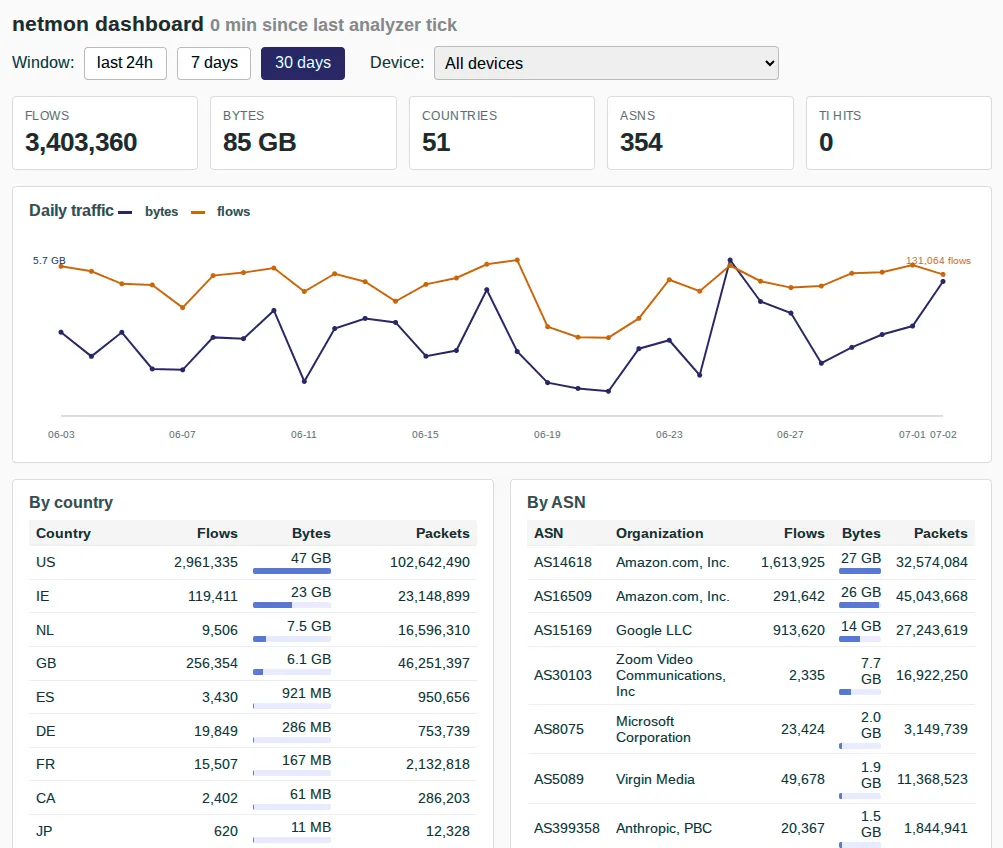
You can see the volume of data grouped by network or country over various time periods. You can also drill into an individual local device.
Even though there are no reported threats, I quickly check this display every few days, looking to see if the traffic profile has changed in a suspicious manner.
Daily Network Profile Email
This is what one of my daily profile change emails looks like:
Subject: [house-net] daily summary: 0 TI hit(s), 18 new ASN(s), 0 new country code(s)

window:  2026-07-01T06:00:00+00:00 -> 2026-07-02T06:00:00+00:00
totals:  0 TI hit(s) across 0 unique destination(s), 18 new ASN(s), 0 new country code(s) across 7 device(s)

172.18.1.15
  new ASNs:
    AS30103       Zoom Video Communications, Inc    e.g. 159.124.21.182

172.18.1.23
  new ASNs:
    AS7941        Internet Archive                  e.g. 207.241.225.195
    AS42697       Netic A/S                         e.g. 77.243.51.122
    AS399784      Internet Archive Canada           e.g. 204.62.248.204

172.18.1.24
  new ASNs:
    AS47474       Virtual1 Limited                  e.g. 193.115.242.165
    AS198554      8X8 UK Limited                    e.g. 109.70.58.81

[snip]
Urgent threat detection email
There is also a second email which tells me of any TI hits as soon as they’re detected (within a minute). Here’s a manually generated example:
Subject: [house-net] LOW: 172.18.1.7 -> 11.22.33.44 | tor-exit

timestamp:    2026-07-03T10:34:33.690726+00:00
kind:         ti-match
severity:     low
source:       172.18.1.7
destination:  11.22.33.44 (address-removed-for-privacy) :9001/TCP
geoip:        DE / AS197540 (netcup GmbH)
bytes/pkts:   0.2 KB / 4
matched:      tor-exit
Tor Threat detection testing
Tor, or The Onion Router is a privacy focussed decentralised virtual network. Very important for some, but it is also used by attackers to disguise their tracks.
In order to test the system, I made a connection to a known Tor exit node. The system alerted me within a minute. As I do not use Tor on my network, this would be an obvious indication something was up.
Code
Is on my github.
Conclusion
This will definitely not catch everything.
I do like having some visibilty of what my network is doing on a normal basis.
And charts, mmm charts!
Leave a comment
Comments are moderated, so yours won't appear immediately. Your email is never published.